

I got an email from ChatGPT last week.
Not a transactional one. Not a password reset. An actual marketing email, asking me to subscribe to their updates.
Think about that for a second. One of the most talked-about AI companies in the world, the people building the technology that supposedly threatens to replace everything, sent me an email. A plain, text-based email asking me to opt in to hear from them more often.
That’s not irony. That’s a strategy.
Why the world’s biggest tech companies still rely on email
OpenAI has hundreds of millions of users. They have an app. They have push notifications. They have a product people use every single day.
And they still sent an email.
Here’s why: they don’t own the relationship with their users.
The app store does. The phone operating system does. The algorithm does. But an email address? That’s a direct line. No middleman. No feed to compete with. No platform to pay for reach.
Email is the only channel where you can message someone directly and know it got there. That’s why every serious NZ business – from a startup to whatever our version of OpenAI is – builds an email list.
The channel isn’t going anywhere. But most businesses use it inconsistently, and that inconsistency kills results.
Is this a good email? Let’s be honest.
Here’s the email I got:

Subject line: Get updates about ChatGPT
Body: Hear about new features and get personalised tips. Subscribe to emails.
That’s it. One button. A short list of what they’d send. A sign-off from “The ChatGPT team.”
What works:
- Clean and simple. One call-to-action.
- Clear value proposition – features, tips, prompts.
- Low commitment. One click to opt in – more on this shortly.
- Easy to say no.
What’s missing:
- There’s no reason to care right now. No urgency. No hook.
- “Hear about new features” is generic. Every SaaS company says this.
- No personality. For a product millions of people find genuinely exciting, this email has all the warmth of a terms-of-service update.
- No social proof. No “join 50 million people” or “our most popular tips every week.”
For a company with OpenAI’s brand recognition, this is a missed opportunity. They’re playing it “safe” when they could be playing it smart.
The lesson isn’t that the email is bad. It’s that even a good company can send a forgettable email. And forgettable emails don’t build audiences.
But here’s the kicker for me. The button says Subscribe to emails – but when you click through, it opens a notifications dashboard.
That’s a miss. When people click “Subscribe to emails”, they expect to subscribe to emails. Not run through a settings screen. I’d bet a lot of people see that dashboard, assume they’re done, close the window, and never actually turn anything on.
What the button should have said was something like Update your Recommendations in Settings – something that signals an action is required, rather than the usual “You’re in!” confirmation people expect when they hit Subscribe. The copy set up one expectation. The destination delivered something else entirely.
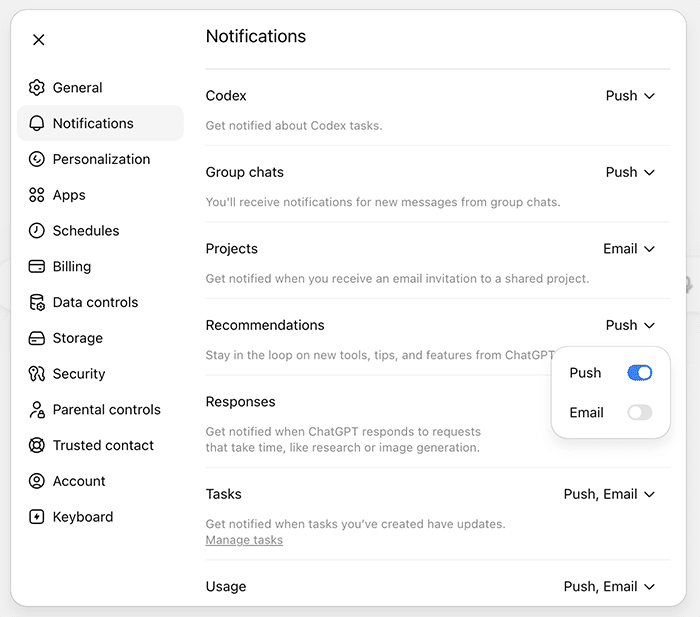
Push notifications vs email: what’s the difference?
That notifications dashboard is actually worth understanding. There are two options throughout: Push and Email. Most people just leave the defaults. Here’s what they actually mean.
Push notifications are the alerts that appear on your phone or desktop from an app. Immediate. Interrupting. Best for things that need your attention right now – a task update, a response to something you asked, a time-sensitive alert.
Email notifications go to your inbox. Less immediate. Better for things you want to review and act on when it suits you – a weekly digest, a project invitation, a usage summary.
The key difference: push is for urgency, email is for value.
What setup makes sense for a busy NZ business owner?
If you’re using ChatGPT as a business tool – and if you’re not, that’s a conversation for another day – here’s a sensible setup:
Turn these on via email:
- Tasks – if you’re using ChatGPT to run research or scheduled tasks, you want a record of what was completed and when. Email suits this.
- Usage – keep an eye on where you’re at with your plan. Email is fine; you don’t need a push alert for this.
Keep these as push (or turn off entirely):
- Responses – if you’re actively using ChatGPT and waiting on a result, push makes sense. But if you’re not watching the screen, turn it off. You’ll check when you get back.
- Recommendations – these are tips and feature updates from OpenAI. Push is unnecessary. If you want to stay informed, email is enough. Honestly, at this stage, you could turn this off completely without missing anything critical.
Turn these off:
- Codex – unless you’re a developer running code tasks, you don’t need this.
- Group chats – if you’re not using ChatGPT’s shared features, turn it off.
The simple rule: if it needs your attention in the next 10 minutes, push is fine. Everything else goes to email or off. Notifications are only useful when they’re rare enough to mean something.
The bigger point
OpenAI sending you an email is a reminder that the fundamentals haven’t changed. Build a list. Stay in contact. Show up consistently. The businesses that do this – regardless of size, industry, or budget – are the ones that don’t have to rely on ads, algorithms, or hope.
If you’re not doing this for your own business, now’s a good time to start.
Glenn Edley runs this place, Spike, an email marketing agency for NZ businesses. He’s been sending the MondayMotivator every week since 2004.
